Accounts payable for multi-entity companies

Stop re-keying invoices across your entities.

Run accounts payable for every entity from one place. Invoices arrive in one inbox, approvals route themselves, and each approved invoice posts to the right Xero file with its documents and approval record.

See Derive in action
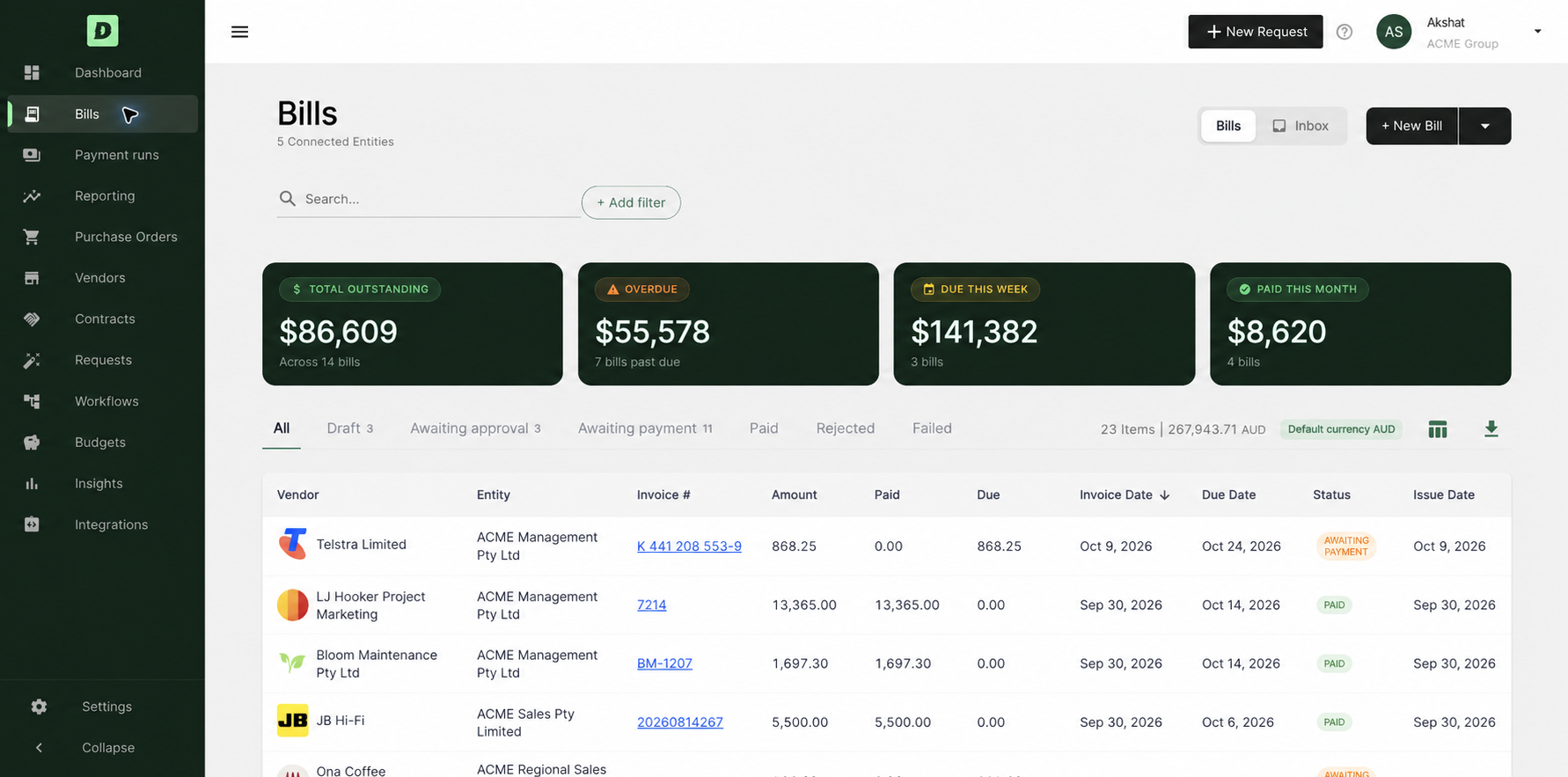
Derive’s Bills screen across 5 connected entities: $86,609 outstanding across 14 bills, $55,578 overdue, and the register of bills by vendor, entity and invoice number.

Accounts payable for groups, simplified

Catch duplicates across the group

Derive sees every entity at once, so it flags an invoice sent to more than one entity by matching invoice numbers, amounts, items and billing details. A tool that sees one file can’t. Catching a duplicate before approval means it is caught before a payment run is built.


Review with the context beside you

The invoice, its source email, the prepared coding and the checks sit side by side. Where an invoice relates to a purchase order, Derive matches it against the PO value or lines. Budget Insight shows what has been spent, committed and is pending, plus this invoice, and it works with or without purchase orders.

Explore budgets

Approve once and post to the right Xero file

Approvals route by entity, amount or category. After final approval, the invoice posts to the right Xero file with its supporting documents and the approval record. Payment status syncs back from Xero.

Derive for Xero

Run one payment batch across your group.

Paying suppliers across entities usually means building a batch in each file. Derive lets your team prepare one payment run across the group, built from invoices that are already approved. Your team reviews the batch before anything is paid.

AP Agent

The AP Agent extracts the details, matches the supplier and entity, codes the bill and runs checks, using your business’s own accounting instructions. Your team reviews and approves.

Explore the AP agent

More time for the work that needs your judgement

Derive is about giving finance its time back. Once extraction, matching and chasing are prepared for your team, there is time for exceptions, supplier relationships, early-payment discounts and cash flow. Your team still makes every approval and stays in control.

Roxanne O'Sullivan
24 Xero files. One Derive inbox.
Roxanne O'Sullivan CFO, Amalgamated Property Group
Story coming soon

Trusted by top finance teams running groups

  • Amalgamated Property Group
  • CyberCX
  • Anytime Fitness
  • Spark Renewables
  • Prezzee
  • Metro Finance
  • Sammut
  • Horizon Accounting Group

Who it's for

Growing group businesses running 5–50+ entities on Xero with a lean finance team, including franchise networks, commercial property portfolios and multi-site operators.

Explore our products

FAQ

Do we need to purchase both modules to start?

No. Accounts Payable module works on its own. You can add purchase orders later, and budgets can be tracked as bills arrive without them.

How does the agent use our accounting instructions?

It applies instructions kept for each supplier and entity, such as how to code a bill or whether to consolidate its lines, alongside the invoice itself.

Can the team correct the agent’s work?

Yes. Corrections are used to revise the instructions for that supplier and entity.

See what your AP team could stop preparing by hand.

See Derive in action